← App Store AETHER Sign in
$12VST3AUWindowsmacOS

AETHER

Dynamic Air Exciter

Air you can aim.

Tunable presence and air bands, a real harmonic exciter, and a sibilance-aware limiter that keeps the sparkle and drops the harshness. Point the air at the centre for a lead vocal, or out to the sides for a choir.

See the controls

$12 once · one key covers two computers · installs through Amanorsac Hub

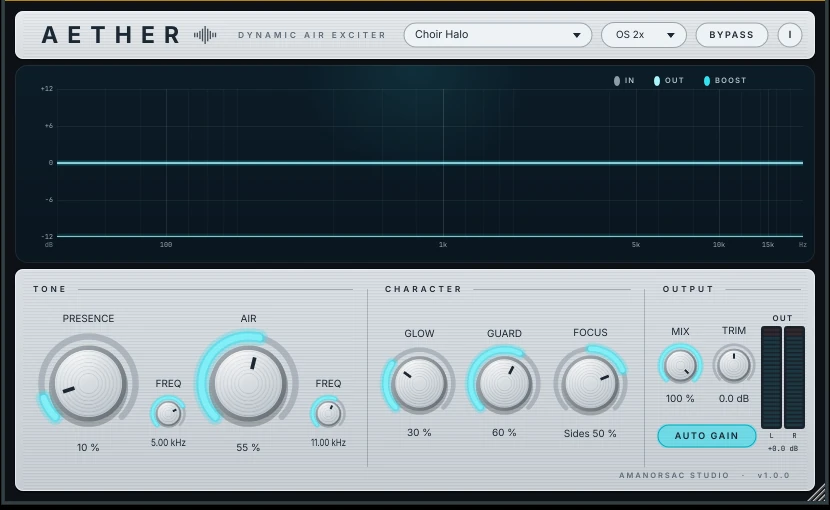
AETHER's interface: the analyser across the top, then presence, air, glow, guard, focus and the output section

The interface, at rest · the analyser draws the boost curve once audio is running through it

The five controls

Five things to turn, and each one does a job you can name.

Presence

A wide, musical lift between 1.5 and 8 kHz. Bite and articulation. Tunable, not fixed at a frequency somebody else chose.

Air

A high shelf with a soft resonant corner, 6 to 18 kHz. Silk and sparkle. Also tunable, so it sits where the source needs it.

Glow

Harmonic excitation. It generates top end that was never in the recording, which is what rescues a dull vocal or a distant choir mic. An EQ can only lift what is already there. This does not have that problem.

Guard

Watches the 5 to 9 kHz range and pulls back the boost, and only the boost, when it gets hot. The air stays. The sibilance does not.

Focus

Sweeps the air from the centre of the stereo image out to the sides. Centre for a lead vocal that has to stay put. Sides for pads, choir and width.

And under them: Mix for parallel blending, Auto Gain for loudness-matched comparison, 2× and 4× oversampling around the exciter, and a live analyser that draws exactly what is being added rather than a decorative animation.

Where it sits

Against the one you already have.

Fresh Air is a good free plugin with a deliberately narrow design: two sliders, no decisions. This is the comparison for people who have hit the edge of that.

Fresh AirAETHER
BandsTwo, fixed centresPresence (1.5–8 kHz) and Air (6–18 kHz), both tunable
HarmonicsNone — it is EQAsymmetric soft-saturation exciter, band-limited to the air region
Harshness controlNoneProgram-dependent reduction on the boost only, when 5–9 kHz gets hot
StereoL/RSweep the air from centre to sides
Level honestyTrimRMS-matched wet and dry, so brighter never masquerades as better
Aliasing2× and 4× oversampling around the exciter
MeteringNoneLive in and out spectrum, boost curve, harshness lamp, output meters
PresetsNoneTen, named for the job

Presets

Ten starting points, named for the job.

Open one, and it is already doing something sensible to what you have. Nothing here needs learning before it is useful.

Vocal

Lead vocals, close-mic'd. Presence forward, focus at the centre, guard doing the work on the esses.

Choir

What Focus was built for. Air swept to the sides so a wide source opens up without the middle getting brittle.

Piano

Glow rather than shelf, for the top octaves of a room-recorded piano.

Bus

Gentle across a group. Mix pulled back so it lifts rather than glazes.

Mastering

Small numbers, oversampling up, auto gain on. The setting you audition rather than commit to.

Specifications

What it needs, and what it does not.

Formats

VST3 on Windows. VST3 and AU on macOS.

Windows

Windows 10 or 11, 64-bit.

macOS

macOS 10.13 or later. Universal — Intel and Apple silicon.

Hosts

Any VST3 or AU host: Studio One, Ableton Live, Logic, Reaper, Cubase, FL Studio, and Pro Tools through a VST3 wrapper.

Install

One self-contained installer. No .NET, no runtime download, no administrator rights. It installs per user and uninstalls cleanly from Apps & Features, leaving your presets where they are.

Licensing

No iLok, no dongle, no subscription. A key, two computers, and thirty days offline at a stretch.

Windows will warn you once, and here is why.

The Windows installer is not code-signed yet, so SmartScreen shows a blue box saying it protected your PC. That is Windows not recognising a new publisher, not Windows finding something wrong with the file.

Click More info, then Run anyway. We would rather tell you that here than have you meet it alone.
$12Once, for both machines

One purchase. Two computers. No subscription.

A single perpetual licence, activated from inside the plugin and moved between machines by you whenever you need to. A year of updates is included, and the version you have keeps working after that.

See the controls

Questions, answered.

How does activation work?
The plugin installs and opens for anyone, and stays silent until a key is entered. You paste the key from My Apps into the plugin's own activation screen, and it checks once with our server. After that it runs offline for thirty days at a stretch.
How do I move it to another computer?
Deactivate lives in the plugin's About screen, so you can free a slot yourself without writing to anyone. You can also remove a machine from My Apps.
Where do I find my key?
In My Apps, on the card for the product, the moment the purchase goes through. It is also in the email receipt.
Is there a Mac version?
Yes. Signed by us and notarised by Apple, so it opens without a fight. VST3 and AU, Intel and Apple silicon from the one universal build.
Is there a trial?
Not at the moment. Twelve dollars was set low enough that a trial would cost more to build than it would save anyone.
Does it phone home while I work?
No. It checks a key on activation and quietly now and then afterwards. It does not send your audio anywhere, and it has no analytics in it. The privacy policy says exactly what is stored.