VST3  ·  STANDALONE  ·  WINDOWS & MACOS

ONE MASTER BUS.
TWO INDEPENDENT
OUTPUTS.

SecondOut mirrors your DAW's master bus to a second output device — without touching your main audio interface. Stream your mix, feed a switcher, or record a safety copy, while your monitoring path stays exactly as it is.

See how it works

$19, once  ·  lifetime license  ·  1 year of updates included  ·  version 1.3.2 for Windows and macOS  ·  signed and notarised  ·  installs through Amanorsac Hub

DAW MASTER BUS AUDIO INTERFACE · ASIO YOUR MONITORS UNCHANGED SECONDOUT · WASAPI SECOND DEVICE NEW · INDEPENDENT
Your existing monitoring path — SecondOut never touches it
The second path SecondOut opens on its own
The problem

ASIO gives you
one stream. Exclusively.

ASIO drivers lock a device to one process at a time — brilliant for low-latency tracking, useless the moment you also need that same mix somewhere else: a switcher for a service, an encoder for a stream, a safety recording running in parallel.

Without SecondOut

Pick one destination.

Your DAW owns the interface. Nothing else can open it — not OBS, not a second console, not a hardware switcher — without stopping your session first.

With SecondOut

Keep both.

Your interface stays exactly as configured. SecondOut opens a second, independent connection alongside it — no session interruption, no re-patching.

How it works

It taps the signal
before ASIO ever sees it.

SecondOut is a plugin, not a driver replacement. It sits on your master bus like any other insert — reading the exact audio your DAW is about to output, then handling the second device entirely on its own.

01TAP

Reads the post-fader signal, inside your DAW

Drop it on the master bus. It copies the exact mix you're hearing — before it ever reaches your audio driver — so the feed matches your monitors sample for sample.

02STREAM

Opens its own WASAPI connection to Device B

Independent of ASIO entirely. Runs in shared mode by design, so it won't fight your interface — or anything else — for exclusive access to a device. Switching devices happens on a background thread, so the plugin window never locks up while it reconnects.

03CORRECT

Keeps two unsynced clocks locked together

Your DAW and the second device run on separate hardware clocks that drift apart by nature. A servo loop nudges the resampling ratio by fractions of a sample per second — the buffer stays centred, and you never hear it happen.

04ROUTE

Picks a specific pair on multi-channel interfaces

On an interface with more than two outputs, choose exactly which pair SecondOut uses — outputs 1-2, 3-4, and so on. Run several SecondOut instances at once, each on its own pair, to send different mixes out different outputs of the same interface simultaneously.

The interface

Built to be glanced at,
not stared at.

One screen. One question it answers instantly: is the feed healthy? Everything else stays out of the way until you need it.
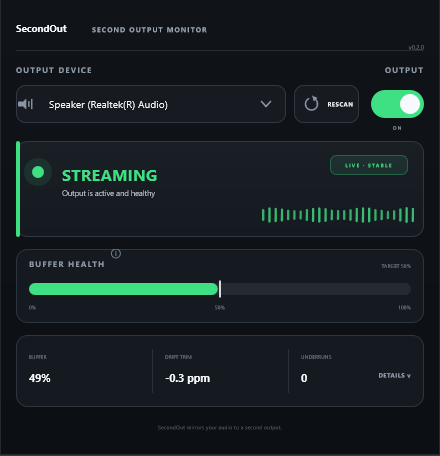
SecondOut plugin window, showing an active stream to a Realtek output device with buffer health at 49 percent, drift trim at -0.3 ppm, and zero underruns

A status you can read from across the room

One glance answers it: streaming, buffering, or a problem — never a wall of meters.

Buffer health, not a black box

Watch the drift correction hold centre. If it starts creeping toward an edge, you'll see it before it becomes a dropout.

Every device your system can see

Physical interfaces or virtual cables — pick any WASAPI output, rescan when something changes.

Clear about failure, not silent about it

Device disconnected, or another app already has it open — SecondOut says which, and what to do next.

A channel picker for multi-output interfaces

Shows up automatically once a device reports more than two outputs — pick the exact pair this instance should use.

Specifications

The numbers that matter
when it's live.

System requirements & behaviourVersion 1.3.2
Format
VST3
Also included
Standalone app
Platform
Windows 10/11 · macOS 11+
Output mode
WASAPI shared (Windows)
Channels
Selectable pair
Buffer window
~400 ms
Drift correction
< 10 ppm servo
Sample rate
Auto-matched
Your interface
Never touched

The mechanism described above is the Windows build's. The macOS build is new in version 1.3.2 and does the same job through the system's own audio stack; one purchase covers both.

Where it fits

Anywhere one mix
needs two destinations.

Broadcast

Feed a switcher or encoder from your DAW's master bus while your interface stays dedicated to monitoring.

Church & live AV

Send the mix to a streaming rig during a service without repatching the console or your monitor path.

Podcasting & streaming

Route your session into OBS or a capture app through a virtual cable, no exclusive-mode conflicts.

Safety recording

Keep a parallel record of the mix on a second device, isolated from your primary signal chain.

Multi-mix distribution

Run several SecondOut instances at once, each on its own output pair of the same interface, to send different mixes to different destinations simultaneously.

Get SecondOut

$19, once.
Windows & macOS.

VST3 · Standalone · signed on Windows, notarised on macOS

Lifetime license, one year of updates included. Buy it, install it through Amanorsac Hub, and paste the license key from your account into the plugin — one key, up to two devices, managed from My Apps.

OUTPUT ON